

Why CMYK Percentages Alone Don't Guarantee a Consistent Colour

Why CMYK percentages alone don't guarantee a colour
We're well into the digital age, yet there's still a fair bit of confusion around CMYK and RGB colour models. Here's an overview of the CMYK colour model and the effect it has on digital print. The biggest misconception is that a colour specified purely as CMYK percentages represents an actual, fixed colour. It would be unfair to blame a digital printer for producing the "wrong" colour if all you provided was a combination of CMYK percentages, like the ones often seen in corporate identity manuals. Here's why.
CMYK and RGB are device dependent colour models. This means they don't represent a precise colour unless they're associated with a colour space, or ICC profile, for a specific device, such as US Web Coated SWOP v2. Without that association, they're simply numbers representing a percentage of unknown ink. Most ICC profiles loaded into design software like Adobe Photoshop have reasonably similar hues and densities, so colour representation looks fairly consistent when switching between them on screen. Digital print is different, because of the diversity of inks and media involved. For the CMYK colour model to work properly, we have to build and maintain accurate output ICC profiles for our own equipment too.
We use inksets from a number of manufacturers, each with unique properties, hue being one of the more significant. Different brands vary, sometimes quite a lot. This means the same file, CMYK values with no ICC profile attached, can produce inconsistent colour across different inksets. But if you create a file and embed the US Web Coated SWOP v2 ICC profile, we know exactly what colour you're expecting from that colour space. We then set that in our software, and it reformulates the percentages to best represent that colour on the specific printer and substrate being used. This process also accounts for the colour and absorption properties of the media itself, papers, banners, vinyls and plastics all have different white points, which affects the resulting colour.
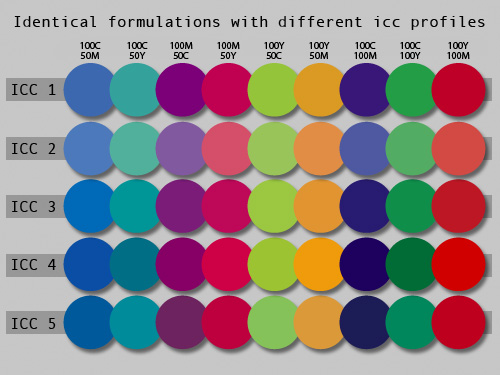
This chart demonstrates how a mix of five ICC profiles represent the same CMYK formulations, left uncontrolled. In a colour managed environment, our software adjusts each of these colours to best match the embedded or specified ICC colour space.
In an ideal world, you'd have a calibrated monitor with its ICC profile set in your computer's colour management, and your design programme would have colour management switched on with working spaces defined. Your computer would then match what's on your screen to the ICC space set in your design programme. When you send us your file, we can see the colour space it was created in, preserve that, and set our printers to match it. In a perfect world, the colour in your file would look the same on your screen and on the final print. In reality, there are plenty of factors that get in the way of complete accuracy, but the upside is that a properly colour managed digital print environment is genuinely accurate, and just as importantly, consistent.
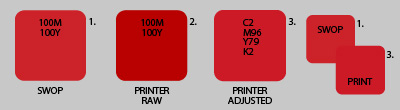
This chart demonstrates how the values for a red are modified to match the red of US Web Coated SWOP v2, using one of our fabric flag ICC profiles.
It's worth remembering that M100, Y100 isn't a colour to match on its own. We can call it red, but we don't know what kind of red, slightly dark, slightly light, slightly orange, or slightly blue. M100, Y100 in the US Web Coated SWOP v2 colour space, on the other hand, is a specific colour, and yes, it's still a red. If you want your colours to hit consistently, always associate an ICC profile with your files. If you don't, we'll use your programme's defaults and assume the colour management settings haven't been touched. Even if it's not the exact right ICC profile for the job, matching to something is always better than matching to nothing.
Corporate colour manuals that use CMYK and RGB formulations should always state the colour space they're referring to, that's what makes consistent print possible.
FAQs
Does specifying a colour as CMYK percentages guarantee it will print correctly?
No. CMYK and RGB are device dependent colour models, meaning the same percentages can produce different colours on different printers or inksets unless they're linked to an ICC colour profile that defines the exact colour space being used.
What is an ICC profile and why does it matter for print colour?
An ICC profile defines a specific colour space, such as US Web Coated SWOP v2, so that a colour value like 100% Magenta and 100% Yellow refers to one exact colour rather than an ambiguous shade of red. Embedding an ICC profile in your file lets a printer reformulate the colour accurately for its specific printer and substrate.
Should corporate colour manuals include an ICC profile or colour space reference?
Yes. A corporate colour manual that lists only CMYK or RGB percentages without stating the associated colour space can lead to inconsistent print results across different printers and materials.

Custom Banners in Christchurch and Across NZ: Materials, Sizes and Choosing What's Right for Your Job
.jpeg)
Choosing a Signage Company in Christchurch: Questions to Ask Before You Commit